Your OTT platform goes live in 72 hours. The content is locked. The marketing campaign is scheduled. The investor call is confirmed for launch day.
Then the QC team flags it.
“Our Netflix captions don’t meet their 40-character line-length requirement. And Amazon says our closed captions are missing emergency information markers. We need new files by tomorrow morning.”
What happens next determines whether your launch wins or crashes. Whether you hit the market with polish or with embarrassment. Whether your team is celebrated or scrambling through the weekend.
This scenario plays out across streaming platforms, broadcasters, and post-production teams every single week. And the root cause? A misunderstanding between two words that seem identical but operate in completely different universes: closed captions and subtitles.
Why Your Audience Is Voting With The Mute Button
Here’s what most people don’t realize: captions and subtitles aren’t interchangeable. They’re not variations on the same thing. They’re fundamentally different tools designed to solve different problems.
In the U.S., 85% of video content consumed on social platforms is watched without sound. On streaming platforms, the demand for accessibility has created a new consumer expectation: if the content isn’t captioned, it’s not finished.
But here’s the tension: accessibility compliance, platform conformance, and audience experience aren’t always pulling in the same direction. A caption solution that satisfies FCC broadcast standards might fail Netflix delivery specs. Subtitles that work brilliantly for international audiences might leave hearing-impaired viewers missing context. And the technical requirements? They vary by platform, by content type, and by regulatory jurisdiction.
Get this wrong, and you face launch delays, rejected assets, platform penalties, or worse: viewers who give up and click away.
Closed Captions: More Than Just Words (They Tell A Story)
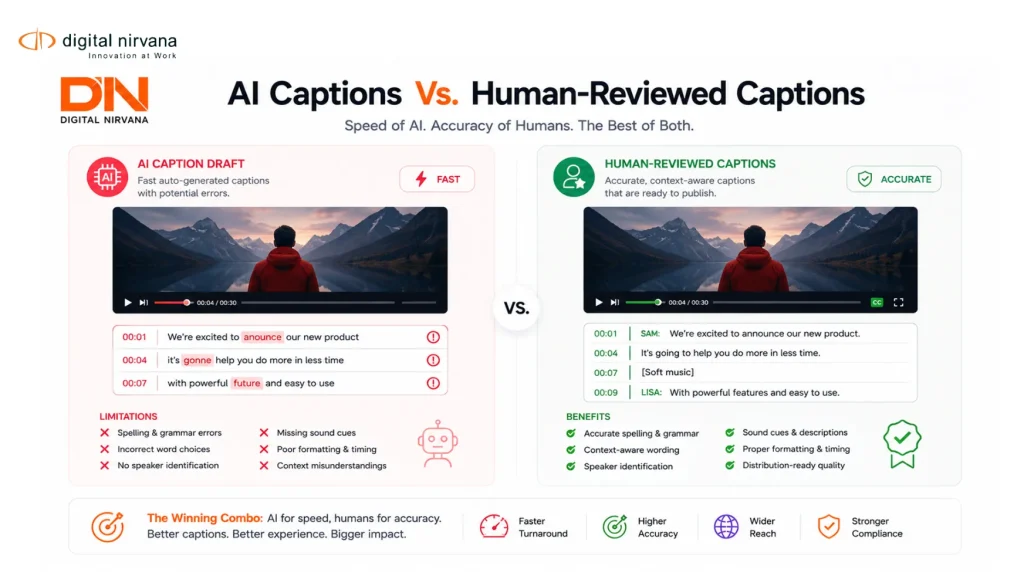
Closed captions (CC) do something subtitles don’t: they transcribe everything spoken in a video, plus they tag the additional context that hearing-impaired audiences rely on to understand what’s happening.
Think of closed captions as a complete accessibility translation. A speaker says something angry. The dialogue reads angry. But the CC also notes “[voice raised, speaking urgently]” or “[sarcasm]” or “[phone ringing in background]” because those sonic details change meaning. They change understanding. They change whether a hearing-impaired viewer gets the full experience or just half of it.
Closed captions appear on screen as rendered text (they can’t be turned off without disabling the entire caption track). They follow specific formatting rules, specific character limits, and specific display timings. In the U.S., the FCC mandates closed captions on broadcast television. The ADA requires them for online video content in many contexts. And streaming platforms have their own house rules layered on top.
The technical nitty-gritty:
- CEA-608 format (older broadcast standard): Limited to text-only, max 32 characters per line, used primarily in the U.S.
- CEA-708 format (modern broadcast standard): Supports colors, fonts, positioning, still widely used in broadcast and cable.
- WebVTT format: Web-native caption format, increasingly used for OTT and web video, simpler to implement.
- SRT format: Subtitle file format, works across platforms but offers limited styling.
Each format has different character limitations, different timing precision, and different compatibility. Choose the wrong format, and your content won’t display correctly on the platform you’re targeting.
Subtitles: Elegant Translation, Not Accessibility
Subtitles are leaner, cleaner, and designed for a different purpose: translation.
A viewer speaks English but watches a Spanish-language film. Subtitles provide the translation. A podcast reaches global audiences. Subtitles localize it without dubbing. An online course targets multilingual learners. Subtitles make it accessible in every language.
Here’s what subtitles don’t do: they don’t include sound descriptions. They don’t tag “[laughter]” or “[door slams]” or “[music swells]”. They don’t note that the background dialogue is a crucial plot clue. Subtitles assume the viewer can hear the content. They just can’t understand the language.
This is why subtitles and closed captions are not interchangeable, no matter how many creators treat them as synonyms.
Subtitles are typically shorter, more concise, and focused purely on dialogue and essential on-screen text. They’re designed to translate what’s said, not to describe what’s heard.
The Hidden Differences That Make or Break Your Launch
This is where it gets real: the small differences between captions and subtitles create enormous practical consequences.
Character Count & Line Length: Netflix captions: max 42 characters per line. Amazon Prime Video: max 40 characters, 2 lines max. Hulu: max 37 characters. Subtitles for streaming don’t have these limits but benefit from them anyway for readability.
Timing & Sync: Closed captions must be frame-accurate in broadcast (down to 1/30th of a second for NTSC video). Subtitles can be slightly more forgiving, typically synced to within 100 milliseconds.
Sound Design Integration: Closed captions must note when music changes in intensity, when ambient sound shifts, when silence becomes meaningful. Subtitles ignore all of this.
Color & Formatting: Modern closed captions can include color coding (speaker ID, music cues, etc.). Subtitles typically stay neutral.
Positioning: Closed captions can appear anywhere on screen (top, bottom, sides) depending on the content. Subtitles are usually bottom-centered for consistency and readability.
Imagine uploading a file thinking it’s caption-compliant, then discovering mid-launch that your timing is off by 200 milliseconds across the entire 50-minute episode. Or that your character count violated platform requirements on 40% of dialogue cards. These aren’t small issues. They’re platform rejections. They’re launch delays. They’re the kind of problems that force you to re-QC, re-deliver, and lose momentum.
Caption Conformance: The Silent Killer of OTT Launches
Here’s what keeps post-production managers awake at night: every streaming platform has its own conformance requirements, and they’re not always published. You find out when your assets are rejected.
Netflix requires specific formatting for speaker identification, color coding for music cues, and positioning that avoids critical on-screen action. Amazon Prime Video has different rules. Apple TV+ has different rules again. Hulu adds another layer. And if you’re launching internationally, each regional platform adds its own requirements.
This is why caption conformance is its own discipline. It’s not just about accuracy or timing. It’s about meeting the technical specifications of every platform you’re targeting. And because platforms update their specs regularly, last year’s “approved” file might fail this year’s QC.
Post-production teams manage this through iterative QC cycles: create captions, test against platform specs, identify failures, adjust, resubmit, repeat. Each cycle adds days to your timeline. Each failure adds cost. This is the hidden tax of poor caption planning.
Why Your Post-Production Team is Losing Hours (And Revenue)
Here’s the operational reality: a single 50-minute episode requires different caption files for different platforms, each with different formatting requirements, each requiring separate QC cycles, each carrying the risk of rejection.
A post-production house handling a typical streaming series (8-10 episodes per season) might spend 120+ hours on caption QC alone. That’s equivalent to 3 weeks of full-time work dedicated entirely to making sure captions meet platform specs. Multiply that across multiple seasons, multiple platforms, multiple languages, and the operational burden explodes.
Some of that labor is unavoidable. Some of it is catastrophically inefficient.
The inefficiency usually comes from:
- Manual QC processes instead of automated conformance checks
- Recreating caption files for each platform instead of generating them from a single master
- Platform spec updates requiring retroactive file regeneration
- Lack of tooling to enforce conformance rules during caption creation
- Communication gaps between caption creators, QC teams, and platform requirements
This is where the difference between closed captions and subtitles creates compounding problems. Not only do you need different files for different platforms. You need different files for captions vs. subtitles. A file that’s caption-compliant for Netflix might not be subtitle-compliant for international distribution. You’re not managing one set of deliverables. You’re managing three or four.
Global Reach vs. Accessibility: The Strategic Choice
Here’s a decision that OTT platform managers face constantly: invest in closed captions for accessibility, or invest in subtitles for localization?
The answer isn’t either/or. It’s both. But the timing, the resources, and the platform prioritization matter enormously.
U.S.-first streaming platforms usually prioritize closed captions. The market is large, regulatory compliance is mandatory, and the accessibility audience is substantial and vocal. Launch with captions, then layer in international subtitles.
International platforms or content that’s launching simultaneously in multiple languages usually prioritize subtitles. Reach the broadest audience fast, then add captions later for accessibility compliance.
Neither choice is wrong. But the choice shapes your production timeline, your QC requirements, your platform readiness, and ultimately your launch success.
The tension: adding multilingual subtitles is fast and relatively inexpensive if you’re outsourcing to a localization vendor. Adding closed captions requires different expertise (sound description, audio context, accessibility compliance) and carries higher platform-specific customization requirements.
Technical Requirements That Trip Everyone Up
Let’s talk about the specific technical things that destroy launches:
Subtitle Format Compatibility: You created captions in .srt format (a common subtitle format) and assumed it would work everywhere. It doesn’t. Netflix wants WebVTT. Amazon prefers .vtt with specific metadata. Apple TV+ has its own requirements. The format difference isn’t cosmetic. It changes whether your timing data is preserved, whether your formatting renders correctly, whether the file even imports.
Character Encoding Issues: You created captions on a Mac (UTF-8 encoding). Someone else opens the file on Windows (different encoding). Special characters break, accents disappear, or non-Latin scripts render as garbage. This seems trivial until you’re 48 hours from launch discovering that your Spanish subtitles are unreadable.
Timing Precision Mismatches: Your caption file uses frame-based timing (designed for broadcast). Your platform expects millisecond-based timing (designed for streaming). The conversion loses precision. Captions appear slightly before or after dialogue, creating a subtle but noticeable sync issue that’s maddening to viewers and impossible to ignore.
Metadata & Styling Loss: You applied color coding, speaker identification, and font styling to your captions. The platform doesn’t support that metadata. Those details strip out during ingestion, and your carefully structured captions become plain text. All that work, wasted.
These issues aren’t edge cases. They’re regular occurrence patterns that affect 30-40% of first-pass submissions at major platforms.
How Digital Nirvana Solves Caption and Subtitle Challenges at Scale
This is where workflow automation changes the game. Instead of manually creating, testing, and resubmitting caption files for each platform, you need a system that understands conformance requirements, enforces them during creation, and auto-generates platform-specific deliverables.
TranceIQ is built exactly for this problem. It creates transcripts, captions, and subtitles from source video or audio, then applies platform-specific conformance rules automatically. Your master captions get generated once. Platform-specific variants (Netflix, Amazon, Apple TV+, Hulu) get generated with correct formatting, correct character limits, correct timing precision.
The workflow becomes: upload video, configure platform requirements (which platforms are you launching on?), generate captions, QC once against your master file (not multiple times against platform specs), export platform-specific files. What used to take 3-4 weeks now takes 3-4 days.
Media Enrichment services layer in human review where it matters most: sound description quality, speaker accuracy, cultural/linguistic nuance for international markets. Automation handles the mechanical work. Humans handle the expertise.
Real-World Workflow: From Chaos to Confidence
Here’s what it looks like when a post-production team stops managing captions manually and starts managing them systematically:
Before: Episode locked → Caption team creates .srt file → Submit to Netflix → Netflix rejects for character count → Revise entire episode → Resubmit → Rejects for timing → Revise again → Finally approved after 2 weeks. Repeat for Amazon Prime, Apple TV+, and international subtitles. 8-12 week timeline before all platform assets are approved.
After: Episode locked → Upload to TranceIQ → Select target platforms (Netflix, Amazon, Apple TV+, 3 international languages) → Automated caption generation with platform-specific conformance → QC review (once) against master file → Export platform-specific variants ready for ingestion. All assets approved within 5 business days.
That’s not hypothetical efficiency. That’s the actual difference between systematic caption management and manual ad-hoc creation.
Common Mistakes That Delay Your Launch
Mistake 1: Treating captions and subtitles as interchangeable. They’re not. Plan for both. Budget for both. QC both separately.
Mistake 2: Assuming last year’s caption file will pass this year’s platform QC. Platforms update specs regularly. Your “approved” file from 2023 might fail conformance in 2024. Schedule periodic re-validation.
Mistake 3: Creating one caption file and repurposing it for every platform. Netflix specs aren’t Amazon specs. Amazon specs aren’t Hulu specs. You need platform-specific variants, or you’re leaving the door open for rejection.
Mistake 4: Skipping sound description. Hearing-impaired viewers depend on audio context clues. “[Music builds emotionally]” or “[tires screech, car horn blares]” aren’t nice-to-haves. They’re essential accessibility information.
Mistake 5: Outsourcing captions to a generic transcription vendor. Generic transcription captures dialogue. Professional captioning captures context, intent, and accessibility requirements. You’re not paying for the same service.
What You Should Actually Measure
If you’re managing caption delivery for streaming platforms, track these metrics:
- Platform conformance pass rate on first submission (target: 95%+)
- Time from episode lock to all-platform-approved (target: under 7 business days)
- Rework cycles per episode (target: 1 or fewer)
- Caption accuracy rate (target: 99%+)
- Viewer engagement on captioned vs. uncaptioned content (captioned typically 20-30% higher watch time)
These metrics tell you whether your caption workflow is working or whether it’s creating hidden cost and timeline drag.
How Digital Nirvana’s Expertise Matters Here
At Digital Nirvana, we’ve built our entire Captioning, Subtitling & Localization practice around solving these exact problems. We understand the technical requirements of every major streaming platform. We know the regulatory compliance landscape (FCC, ADA, Ofcom, etc.). We’ve invested in technology that enforces conformance automatically, not manually.
MediaServicesIQ adds another layer: AI-powered audio understanding that catches nuances human transcription might miss. Music genre shifts, speaker tone changes, background dialogue that carries plot meaning. These details become tagged, then become part of your caption richness.
And when you need human expertise layered on top (which you do for anything broadcast-quality or highly regulated), Media Enrichment connects you with linguistically trained caption specialists who understand both technical requirements and storytelling nuance.
The result: captions and subtitles that satisfy compliance, meet platform specs, serve accessibility needs, and get you to launch on schedule.
The Bigger Picture: Captions as Competitive Advantage
Here’s what separates winners from also-rans in streaming: winners see captions and subtitles not as compliance checkboxes but as engagement tools.
Captioned content gets watched longer. Searched better. Recommended more. International subtitles expand addressable market instantly. Accessible captions unlock an audience segment that represents 15% of the global population (1.3 billion people with hearing loss).
This isn’t virtue signaling. This is economics. The platforms that win are the ones that make content accessible, searchable, and globally consumable. That starts with captions and subtitles.
Key Takeaways
- Closed captions and subtitles solve different problems. Captions ensure accessibility for hearing-impaired viewers (compliance + context). Subtitles enable translation and localization for international audiences.
- Platform conformance requirements vary significantly. Netflix, Amazon Prime, Apple TV+, and Hulu each have different character limits, formatting rules, and timing requirements. One “approved” file doesn’t work everywhere.
- Manual caption management creates hidden cost and timeline drag. Expect 3-4 weeks and multiple QC cycles if you’re managing captions file-by-file. Systematic workflows with platform-aware automation cut that to 5-7 days.
- Sound description matters for accessibility. Hearing-impaired viewers depend on audio context clues. “[Music swells emotionally]” or “[car horn blares]” isn’t decoration. It’s essential accessibility information.
- Invest in platform-specific caption generation, not manual rework. Create once, generate variants, QC once, export for all platforms. That’s the modern caption workflow.
- Captions drive engagement and reach. Captioned content gets watched longer, searched better, and accessed by broader audiences. Captions are a competitive advantage, not a compliance burden.
Ready to Stop Losing Hours to Caption QC?
Whether you’re launching a streaming series, running a broadcast operation, or managing an international content library, captions matter. But they don’t have to consume your entire timeline.
Explore how TranceIQ and our platform-aware caption solutions can streamline your workflow, ensure conformance, and get you to launch faster. Let’s talk about your caption strategy.