A producer needs the exact wording of something a guest said on Tuesday’s panel.
She knows roughly when. She knows roughly what. She does not know the sentence, and the difference between roughly and exactly is a legal review.
If a transcript exists, this takes forty seconds. If it does not, someone watches an hour of video with a notepad.
That gap is the entire argument for broadcast transcripts, and it explains why they have quietly become infrastructure rather than a deliverable.
What Is a Broadcast Transcript?
A broadcast transcript is the complete text record of everything spoken in a programme, converted from audio to text and aligned to the video or audio timeline with timecodes, usually including speaker labels and notes for relevant non-speech audio.
Think of it as the searchable text twin of your show.
The word doing the work in that definition is aligned. A transcript without timecodes is a document. A transcript with timecodes is an index, and an index is what lets someone jump straight to a frame instead of scrubbing toward it.
What a Usable Transcript Contains
Four elements separate a transcript that works inside a broadcast workflow from a text file that technically contains the right words.
- Accurate speech-to-text, tuned for broadcast audio rather than clean studio conditions
- Speaker identification, either role-based labels such as ANCHOR, REPORTER, or GUEST, or named speakers where known
- Line-level or phrase-level timecodes, so the transcript can drive jump-to-frame behaviour inside an NLE or MAM
- A structured, machine-readable format that downstream systems can parse without cleanup
Optional but frequently useful: contextual markers for laughter, applause, crowd noise, and long silences, which matter more than people expect when the transcript is being used for compliance or clip selection.
Transcript, Caption, Subtitle, Script
These four get used interchangeably in meetings and they are not the same thing.
| Created when | Contains | Primary purpose | |
| Script | Before or during production | The planned version | Guides what should happen on air |
| Transcript | During or after broadcast | What was actually said, timecoded | Search, review, evidence, repurposing |
| Captions | After transcription | Timed display text plus non-speech audio | Accessibility and compliance on screen |
| Subtitles | After translation | Translated dialogue | Language access for hearing viewers |
The practical distinction: a script is intent, a transcript is record. Live content rarely follows the script, because anchors ad-lib, guests go off-topic, and segments get reordered. Our piece on broadcast scripts and transcript search covers how the two layers work together.
Transcripts also become the source material for captions rather than a substitute for them. Caption work adds timing, placement, and format conformance on top, which we cover in our guide to types of closed captions.
Verbatim or Clean Read?
An editorial decision most teams never consciously make, then regret later.
Verbatim captures everything: false starts, stammers, filler words, repetitions, interruptions. It is what you want for compliance, legal review, and any situation where exact wording carries weight.
Clean read, sometimes called intelligent verbatim, removes disfluencies and lightly tidies grammar. It reads better and suits publishing, content repurposing, and internal reference.
The mistake is picking one for the whole operation. News and current affairs generally need verbatim for anything that could be quoted or disputed. Panel shows and long-form interviews being repurposed into articles benefit from clean read. Decide by use case and specify it in the brief, because retrofitting one into the other is manual work.
How Broadcast Transcripts Get Made
Modern workflows are hybrid rather than purely automated or purely human.
- Audio extraction and conditioning from the feed or file
- Automatic speech recognition produces a first-pass timecoded transcript
- Diarization separates and labels speakers
- Domain vocabulary application corrects names, places, teams, sponsors, and technical terms against a supplied glossary
- Human review corrects errors, resolves overlapping speech, and confirms speaker attribution
- Delivery into the PAM, MAM, or NLE where the transcript will actually be used
Step four is the one teams skip and then blame the model for. A glossary of recurring names, programme-specific terminology, and sponsor brands prevents a large share of the errors that would otherwise need manual correction.
Why Broadcast Speech Is Hard to Transcribe
General-purpose speech recognition performs well on a single speaker in a quiet room. Broadcast audio is none of those things.
Overlapping speakers in panel discussions and debates. Crowd noise and commentary layered over stadium audio. Regional accents and code-switching. Proper nouns that carry no phonetic hint, such as player names and constituency names. Rapid delivery under time pressure. Phone-quality remote guests sitting next to studio-quality anchors in the same segment.
This is why broadcast transcription accuracy and general transcription accuracy are different claims. Digital Nirvana’s AI metadata tagging guide notes that leading platforms reach roughly 85 to 95 percent accuracy when paired with periodic human review, and the review layer is what closes the gap on exactly these hard cases.
What Transcripts Unlock Downstream
The transcript is rarely the deliverable. It is the input to several other things.
| Use | What the transcript enables |
| Search and retrieval | Find a quote, a topic, or a person by text and jump to the timecode |
| Compliance evidence | Prove what was said and when, with a timecoded record |
| Captioning and subtitling | Provide the source text for accessibility and localization work |
| Content repurposing | Turn segments into articles, social clips, newsletters, and show notes |
| Metadata enrichment | Feed topic, entity, and sentiment tagging inside the PAM or MAM |
| Licensing and rights | Locate specific content quickly for clip sales and clearance |
| Discovery and SEO | Give search engines and recommendation systems indexable text |
In large newsrooms and post facilities, the timecoded transcript effectively becomes the index for the whole video library. That is the shift worth internalizing: transcription stops being a service you buy per project and becomes a layer you run continuously.
Formats and Where They Go
Transcripts are delivered as plain text or DOCX for reading, as timecoded formats such as JSON or XML for systems integration, and as caption-ready formats when they are feeding a captioning workflow.
The format question matters less than the integration question. A transcript sitting in a vendor portal gets used once. A transcript written into the MAM or appearing as markers inside an Avid bin gets used continuously, by people who never think about transcription at all.
Evaluating a Transcript Workflow
- Timecodes at line or phrase level, not just at segment starts
- Speaker identification, with support for named speakers where known
- Custom vocabulary and glossary support for recurring terms
- Verbatim and clean read both available, specified per content type
- Human review layer, with turnaround defined
- Direct write-back into your PAM, MAM, or NLE
- Live and post-broadcast processing, if you need both
- Secure handling for unreleased, sensitive, or licensed content
- Machine-readable output that downstream systems parse without cleanup
Common Misconceptions
“A transcript and captions are the same deliverable.” They share source text and diverge after that. Captions add timing, placement, and format conformance to meet accessibility obligations. A transcript alone does not satisfy a caption requirement.
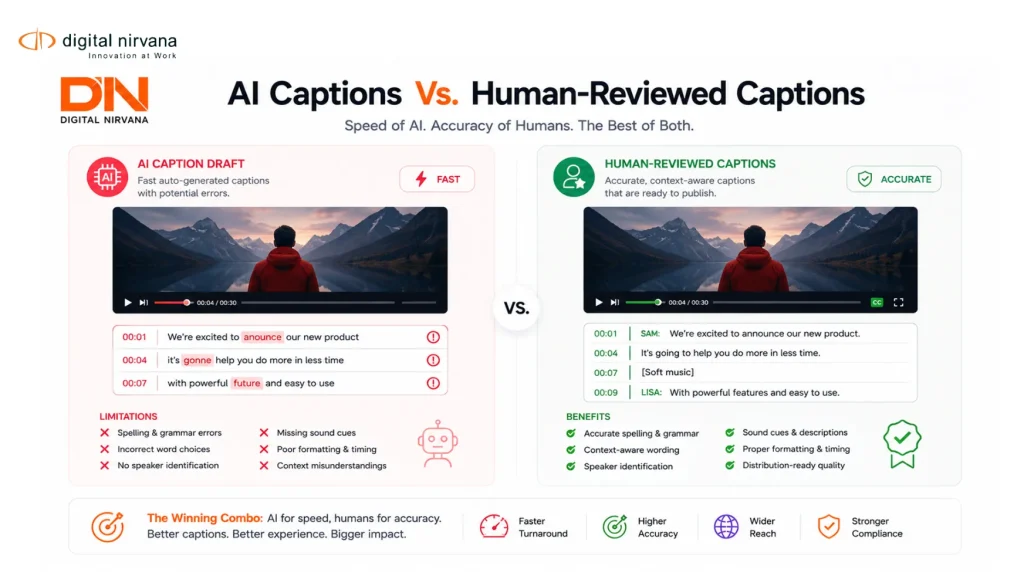
“Automatic transcription is accurate enough now.” For discovery and internal search, frequently yes. For quotes that will be published, disputed, or submitted as evidence, the review layer is not optional.
“We only need transcripts for content we plan to publish.” The highest-value transcripts are often for content nobody plans to revisit, right up until someone needs to prove what aired.
Broadcast Transcript FAQs
What is the difference between a transcript and a script? A script is written before or during production and represents the planned version. A transcript is created from the actual audio and represents what was really said, including departures from the script.
Do transcripts need timecodes? For broadcast use, yes. Without timecodes a transcript cannot drive search, jump-to-frame navigation, or timecoded compliance evidence.
Can transcripts be generated live? Yes. Live processing produces near real-time transcripts for news and events, though accuracy expectations differ from post-broadcast work.
Do transcripts help with accessibility compliance? Indirectly. They supply the source text for captions, but the caption track itself is what satisfies the obligation.
Where Digital Nirvana Fits
TranceIQ handles the transcription layer, producing timecoded transcripts with speaker identification and the option to carry the same source text forward into captions, subtitles, and translations without starting over.
MetadataIQ is what turns those transcripts into something people actually use, writing timecoded markers back into Avid, Grass Valley, and standards-based PAM and MAM environments so producers search from inside the tools already open on their desks. Media Enrichment supplies the managed human review capacity that keeps accuracy defensible at volume, including live work.
For teams extending transcripts into wider analysis, MediaServicesIQ exposes summarization, entity detection, and related capabilities through APIs.
Expertise Behind the Accuracy
Transcription looks like a solved problem until the audio gets difficult.
Two people talking over each other during breaking news. A stadium commentator competing with fifty thousand people. A sponsor name that no general model has encountered. A remote guest on a poor connection in the same segment as a studio anchor. Handling those cases well comes from operating inside broadcast audio rather than benchmarking on clean datasets, and Digital Nirvana has built these workflows with broadcasters, newsrooms, sports networks, post-production houses, and education providers.
The hybrid model follows from that experience. Automation covers the volume no human team can match. Reviewers handle proper nouns, overlapping speech, and attribution, which is where errors actually cost something. You can see how that combination works across our customer success stories and in our overview of metadata solutions for broadcast.
Conclusion
A broadcast transcript is not paperwork. It is the layer that makes everything else in a media operation searchable, provable, and reusable.
Get the fundamentals right and the rest follows. Timecodes at phrase level. Speaker labels. A glossary for recurring names. A verbatim or clean read decision made per content type rather than by default. A review layer sized to what the content is actually used for. And write-back into the systems your teams already work in, because a transcript nobody can reach is a transcript nobody uses.
Want to go deeper on the caption side? Read our guide to automatic closed captioning software for how transcripts become compliant caption deliverables.
Key Takeaways
- A broadcast transcript is the timecoded text record of what was actually said on air, with speaker labels and alignment to the media timeline.
- Timecodes are what turn a transcript from a document into an index. Without them it cannot drive search or jump-to-frame navigation.
- Script is intent, transcript is record. Live content rarely follows the script, which is why both layers matter.
- Transcripts are the source for captions, not a substitute. A caption track is what satisfies accessibility obligations.
- Decide verbatim versus clean read per content type. Verbatim for anything quotable or disputable, clean read for repurposing.
- Supply a glossary of recurring names, terms, and sponsors. It prevents a large share of correctable errors before review.
- Broadcast audio is harder than general audio: overlapping speakers, crowd noise, accents, and proper nouns with no phonetic hint.
- A transcript in a vendor portal gets used once. A transcript inside the MAM or NLE gets used continuously.