It is 4:12 PM. The rundown just changed.
A producer needs eleven seconds of a mayor saying one specific sentence at a press conference from three years ago. Someone thinks it lives on the LTO shelf. Someone else remembers the file was called PRESSER_FINAL_v3_USE_THIS.
That is not an archive. That is a guessing game with a deadline attached.
Media organizing is what turns that guessing game into a search box. And in 2026, the gap between teams who have upgraded and teams who have not is no longer a productivity gap. It is a revenue and compliance gap.
Why “Where Is That Clip?” Costs More Than You Think
The hunt itself is the smallest part of the bill.
The real cost shows up later. A sponsor asks for proof their logo aired and nobody can produce the timecode. A rights window expires on footage the licensing team forgot existed. An editor recuts a sequence from scratch because finding the original selects would take longer than shooting again.
Every one of those is an asset you already paid for, sitting in storage, generating nothing.
Ask your team one question this week: how many minutes pass between “we need that clip” and “here it is.” If nobody can answer, you do not have a media library. You have a warehouse.
What Media Organizing Actually Means
Media organizing is the practice of assigning every audio, video, and graphic asset a consistent identity, a rich set of machine-readable descriptors, and a governed place in a searchable index, from the moment it lands in storage.
Storage answers “where is the file.” Media organizing answers “what is inside the file, who can use it, until when, and at which timecode.”
That distinction is the whole ballgame. A file becomes an asset only when context travels with it.
Why Folder Trees Stop Working at Broadcast Scale
Folder structures work beautifully. For about eighteen months.
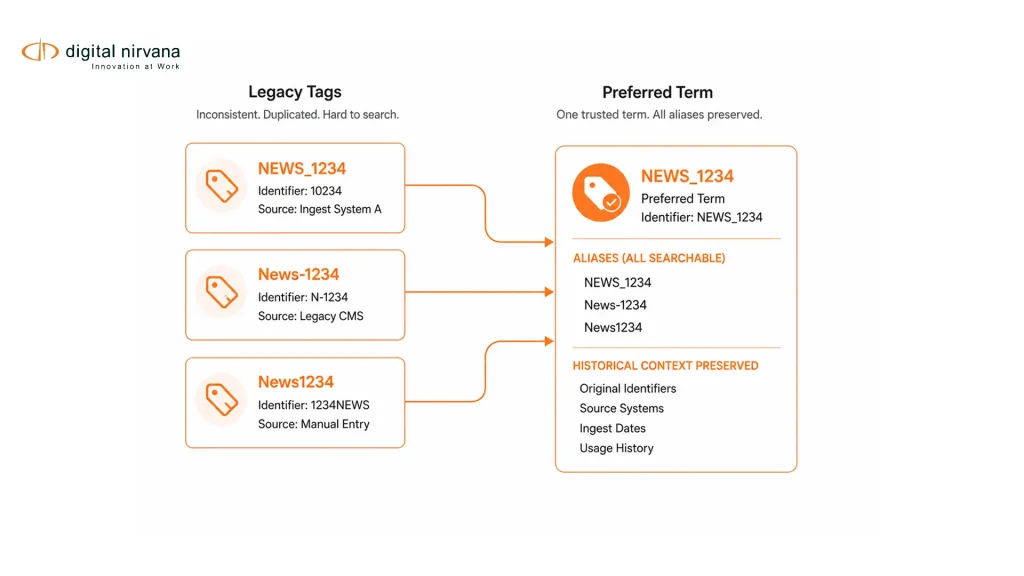
Then three things happen. Naming conventions drift because six people interpret them six ways. Volume outpaces the loggers, so tagging becomes something done “when there is time,” which is never. And the one archivist who knew where everything lived takes a job somewhere else.
Legacy media asset management platforms solved storage and permissions well. Most were never built to describe content at the frame level, which is exactly what teams now search on.
What Changed Since Your Last Archive Audit
Three shifts made this urgent rather than optional.
Accessibility became enforceable. The FCC holds captions to four quality standards: accuracy, synchronicity, completeness, and placement. The European Accessibility Act’s obligations applied from June 2025, pulling audiovisual services into scope across the EU. Compliance now depends on locating and proving, not just delivering.
FAST and OTT changed archive economics. Channels need volume. Libraries that were dead weight in 2020 are programmable inventory in 2026, but only if someone can find and clear the content.
Search intent moved to natural language. Editors no longer want filename matches. They want “wide shot, stadium, rain, 2024, no sponsor logo visible.” That query only works if the archive was described, not just stored.
How AI-Powered Media Organizing Works
Strip away the marketing and it is four layers.
- Unified ingest. Cloud buckets, on-prem arrays, and near-line storage get indexed under one namespace, so location stops mattering to the person searching.
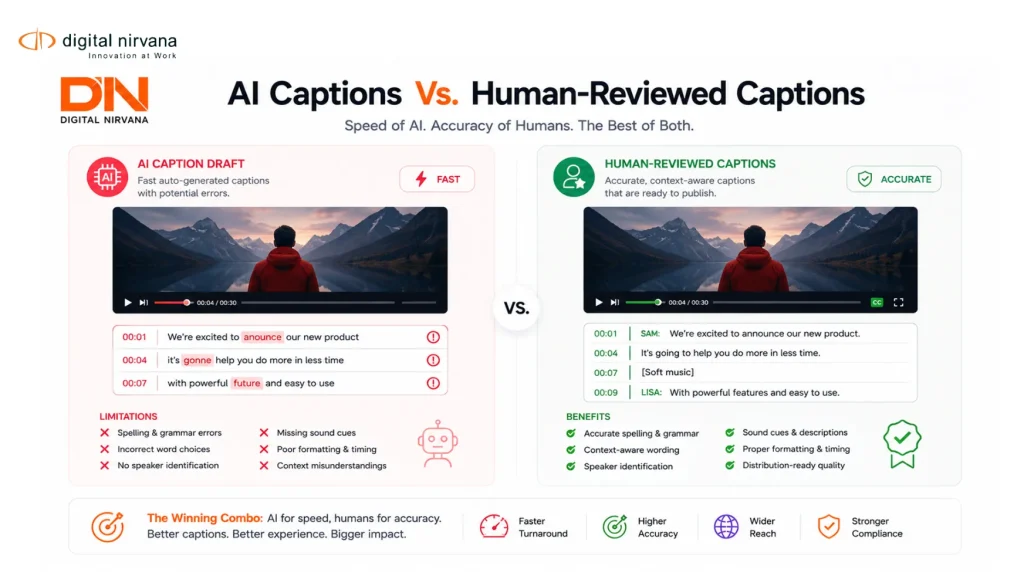
- Machine understanding. Speech-to-text produces time-coded transcripts. Computer vision detects faces, logos, objects, and scene changes. OCR reads on-screen text such as lower thirds and scoreboards.
- Taxonomy mapping. Raw detections get mapped to the vocabulary your team actually uses, plus rule-based tags for sensitive categories like political mentions, profanity, or brand exclusions.
- Write-back. Enriched metadata flows into Avid, Adobe, or any standards-based PAM or MAM through APIs, so editors never leave the tools they know.
Layer three is where most projects succeed or quietly fail. Our guide on metatagging digital assets at scale covers how to design a metadata model that reflects how people search, not how engineers store.
A Day Inside an Organized Newsroom
Same 4:12 PM. Same eleven seconds.
The producer types the mayor’s phrase into the search bar. Transcripts from every ingested feed are already indexed, so the result lands on the exact timecode, not the general clip. She confirms the rights status on the asset record and sends selects to the editor. Elapsed time: under two minutes.
Meanwhile the sports desk pulls a highlight package using player and logo detection, and the social team cuts verticals from the same master without exporting a duplicate. Nobody messaged the archivist.
That is the actual product. Not tags. Removed friction.
What Improves, and How You Prove It
Do not accept vendor promises. Baseline these five before you start, then measure again at ninety days.
| What to measure | How to capture it | Why it matters |
| Time from request to delivered clip | Sample 20 real requests, before and after | The clearest operational proof |
| Archive reuse rate | Percentage of finished pieces containing library footage | Ties metadata directly to production spend |
| Compliance evidence turnaround | Hours to produce timecoded proof on request | Converts risk into a measurable number |
| Caption and localization rework | Rejected deliveries per month | Exposes hidden quality cost |
| Licensable inventory | Assets with complete rights metadata | The gateway to archive monetization |
Digital Nirvana’s own AI metadata tagging guide notes that leading platforms reach roughly 85 to 95 percent accuracy when paired with periodic human review. Plan for that review loop rather than pretending automation is absolute.
Before You Start: A Readiness Checklist
[ ] One named metadata owner, with authority over the taxonomy
[ ] A controlled vocabulary agreed by editorial, archive, and legal
[ ] Rights and retention fields defined before the first batch runs
[ ] Confirmed API compatibility with your existing PAM, MAM, or DAM
[ ] Role-based permissions mapped, including restricted tag visibility
[ ] A representative pilot set: one live show, one archive block, one language
[ ] Human QC sampling defined by risk, tighter on compliance-sensitive tags
[ ] Baseline metrics captured before deployment, not after
Skip the taxonomy step and you get a fast, expensive mess. Speed without structure just helps you find the wrong thing sooner.
The Objections You Will Hear Internally
“Our MAM already does tagging.” Most do basic tagging. Fewer handle frame-level detection across live and archive simultaneously, which is the difference between filing content and finding it. Our breakdown of MAM systems for news, sports, and entertainment covers where the line sits.
“AI accuracy is too risky for compliance work.” Agreed, if AI runs unsupervised. Tune for precision on regulated tasks, recall on discovery tasks, and keep humans reviewing the categories where a mistake costs money.
“We cannot pause production for a migration.” You should not. Run enrichment alongside live workflows, write metadata back into the tools editors already use, and treat the archive as a background batch. The approach is detailed in our piece on managing media assets without slowing production.
Media Organizing FAQs
Is media organizing the same as media asset management? No. Media asset management stores and governs files. Media organizing adds descriptive metadata, taxonomy, and workflow hooks that keep those files usable at production speed.
Can it index hybrid storage? Yes. Modern platforms index cloud buckets and on-prem arrays under a single namespace, so search returns results regardless of where the file physically sits.
Does AI tagging replace archivists? It replaces rote logging. Archivists move to curation, taxonomy governance, and rights policy, which is where their judgment actually pays.
Where Digital Nirvana Fits
This is the problem MetadataIQ was built around. It generates speech-to-text, face and logo identification, and topic tags across live feeds and archives, then writes that metadata back into Avid, Grass Valley, and standards-based PAM and MAM environments without changing how editors work.
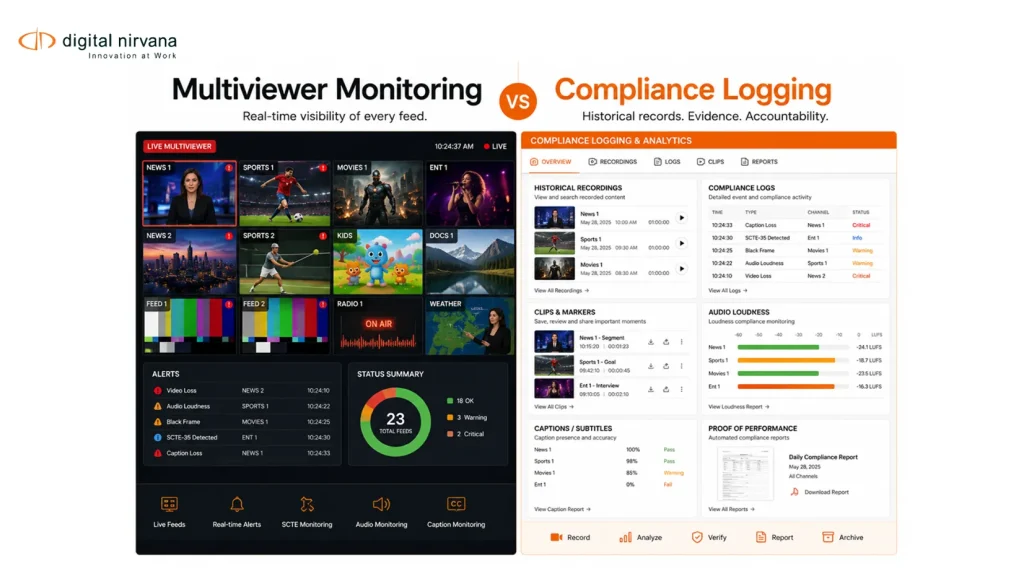
Around it sit the adjacent pieces most media teams eventually need. MonitorIQ captures broadcast feeds and logs compliance events, so ad proof and regulatory evidence exist before anyone asks. TranceIQ handles transcription, captioning, and subtitle localization at delivery scale. MediaServicesIQ exposes the underlying AI capabilities as APIs for teams building their own pipelines. And Media Enrichment supplies the human review layer that keeps accuracy honest.
You do not need all of it. Most teams start with one workflow and expand once the metrics hold.
Experience Behind the Workflow
Media operations expertise is not the same as AI expertise, and this is a domain where the difference shows quickly.
Broadcast has rules generic AI vendors rarely account for: CC 608 and 708 conformance, loudness obligations, SCTE markers, rights windows, and evidence that survives an audit. Digital Nirvana has spent years inside those workflows with broadcasters, OTT platforms, sports networks, and post-production teams, which is why the products integrate with Avid and Grass Valley environments rather than asking teams to abandon them.
The human-in-the-loop model is deliberate for the same reason. Full automation is faster on a slide. Reviewed automation is what survives a compliance conversation. You can see how that plays out in our customer success stories.
Conclusion
Your archive is either an asset or a liability, and the deciding factor is not how much you have stored. It is whether anyone can find, clear, and reuse it under deadline.
Media organizing closes that gap by giving every file a description, a rights history, and a searchable identity from the moment it arrives. Teams that made the upgrade are not just working faster. They are monetizing libraries their competitors have effectively lost.
Start with one workflow, baseline five honest metrics, and let the results argue for the rest.
Ready to see it against your own footage? Request a MetadataIQ workflow review and run a live search on a sample of your archive.
Key Takeaways
- Storage tells you where a file is. Media organizing tells you what is inside it, who can use it, and until when.
- Folder trees and naming conventions predictably fail at scale, usually within two years.
- AI media organizing works in four layers: unified ingest, machine understanding, taxonomy mapping, and write-back to your existing PAM or MAM.
- Taxonomy design, not model selection, is where most projects succeed or quietly fail.
- Expect roughly 85 to 95 percent accuracy with periodic human review, and build that review loop into the plan.
- Baseline five metrics before deployment: request-to-delivery time, archive reuse rate, compliance evidence turnaround, rework volume, and licensable inventory.
- Accessibility enforcement and FAST or OTT economics have moved this from a nice-to-have to a revenue and risk decision.
- Start with one workflow. Expand when the numbers hold.